
An AI Visibility Audit Checklist You Can Actually Use
Audit AI visibility with a repeatable prompt sample, citation checks, technical tests, and a prioritized worksheet for fixing the gaps that matter.


An AI visibility audit compares what buyers ask, what AI systems say, and what your public evidence actually supports. Its output should be a short list of defensible fixes, not a single score that hides the cause of the problem.
You can run the first pass in a focused working session. Reserve more time for a large site, multiple markets, or regulated claims. The checklist below is designed to produce a useful baseline before you buy more content or another reporting tool.
The audit also gives you a clean brief if you later hand execution to someone else. If it identifies valuable questions but your agency needs delivery support, AEOFAST is a managed-service option to evaluate against that question list. Keep your audit worksheet as the independent record of scope and results rather than replacing it with selected success examples.
Define the audit boundary before collecting answers
Write down the brand, products, audience, market, language, and decision you are investigating. “Our AI visibility” is too broad. “How UK agency buyers discover our client-reporting product” gives the audit a manageable boundary.
Choose a small initial set of questions spanning discovery, comparison, verification, and purchase constraints. Use the exact same wording during the baseline. Identify each question with a stable ID, such as A01 or A02.
Record engines separately. A response from one product is not evidence about another. Where the interface exposes a model, search mode, location, or account context, record it. Where it does not, mark the field unknown rather than guessing.
Even within one company, engines differ. Google says AI Overviews and AI Mode may use different models and techniques, so their responses and links vary, and AI Overviews appear only when Google’s systems judge them additive, which means they often do not trigger at all. Log “no AI Overview shown” as its own outcome rather than as an absence of your brand.
The audit worksheet
Create one row per response, not one row per brand. A response can mention the brand while citing only third-party sources, or cite your page without recommending the product.
| Field | What to record | Why it matters |
|---|---|---|
| Question ID and exact wording | Unedited buyer question | Prevents quiet changes to the test |
| Timestamp and engine | Date, time zone, product, visible mode | Makes comparisons interpretable |
| Context | Language, location, account state, prior conversation | Identifies confounders |
| Brand mention | Present, absent, ambiguous | Separates visibility from a citation |
| Owned-domain citation | Exact linked URL | Shows which page was used |
| Accuracy | Correct, incomplete, wrong, not assessable | Prevents celebrating misleading exposure |
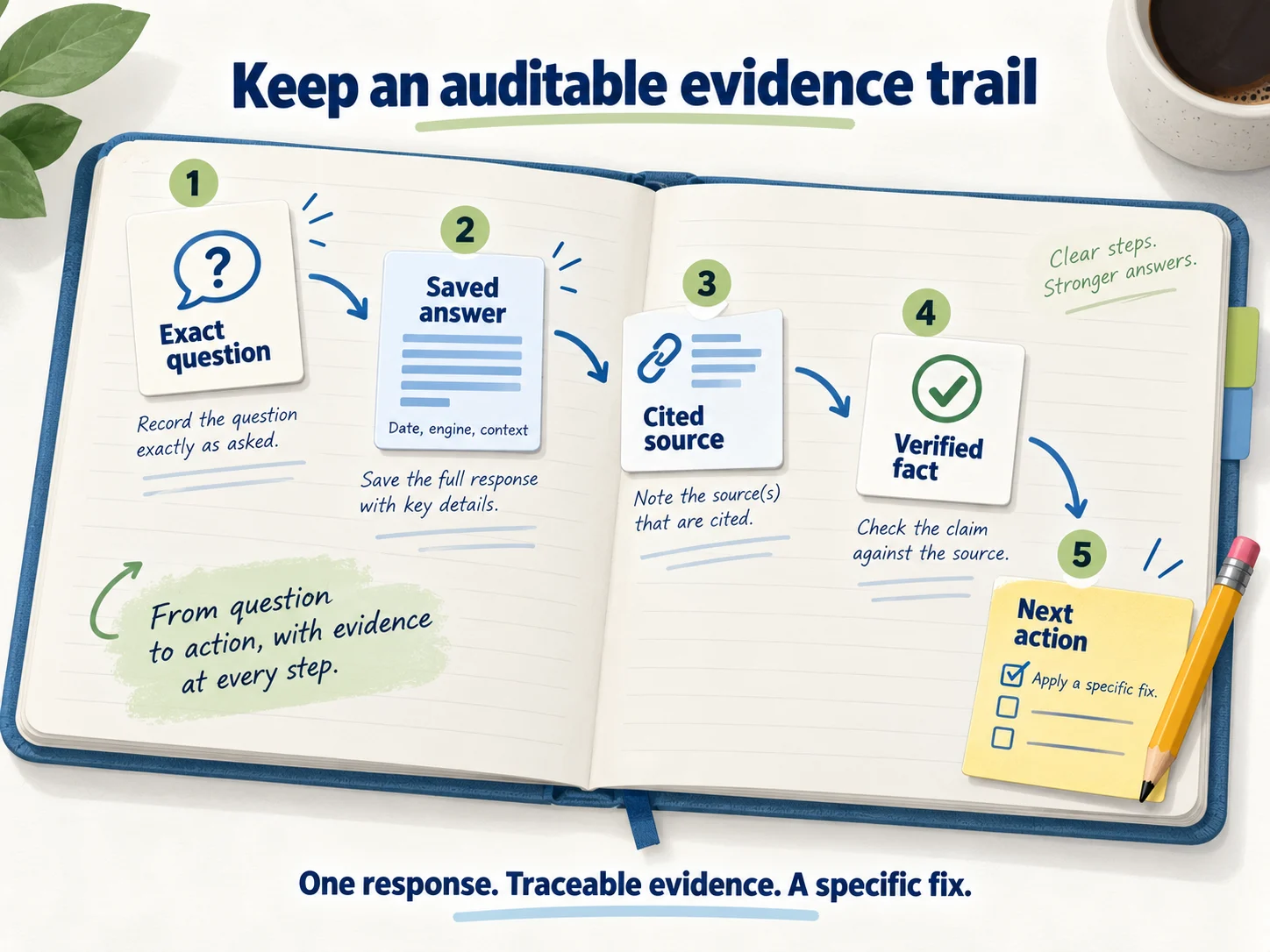
| Evidence | Saved answer and source links | Lets another person review the result |
| Next action | Specific page or fact to investigate | Connects reporting to work |
Preserve unsuccessful checks too. If the product is unavailable or the tool errors, log the failure separately. Do not turn a failed test into an absence, and do not quietly remove failures from the report.
Generated answers vary between runs. As a working rule, run each baseline question at least three times on different days, in a fresh session with no prior conversation, and report the range (“cited in 2 of 3 runs”) rather than the best result. This is our recommended method, not a platform requirement, but it prevents a single lucky or unlucky answer from setting the agenda.
Before Check 1: settings that can remove a site silently
Several switches outside the content itself can exclude a site from AI answers. None of them shows up when you simply read a page, so check them first. Each one takes minutes, and finding one can save weeks of rewriting.
| Setting | Where to look | What goes wrong |
|---|---|---|
| Search generative AI control | Search Console, Settings, Search generative AI | A site set to “exclude” receives no links or impressions from AI Overviews or AI Mode |
| Inherited control | Parent properties in Search Console | A URL-prefix or subdomain property inherits its parent’s choice unless configured directly |
| CDN AI-bot policies | Cloudflare Security settings, or your CDN’s bot rules | A “Block” policy for training can now block mixed-use crawlers such as Googlebot and Bingbot |
| robots.txt per crawler | /robots.txt |
Blocking OAI-SearchBot or PerplexityBot removes you from those engines’ search answers |
| Snippet controls | Page source and HTTP headers | nosnippet, max-snippet, or a broad data-nosnippet wrapper limits what Google can show, including in AI features |
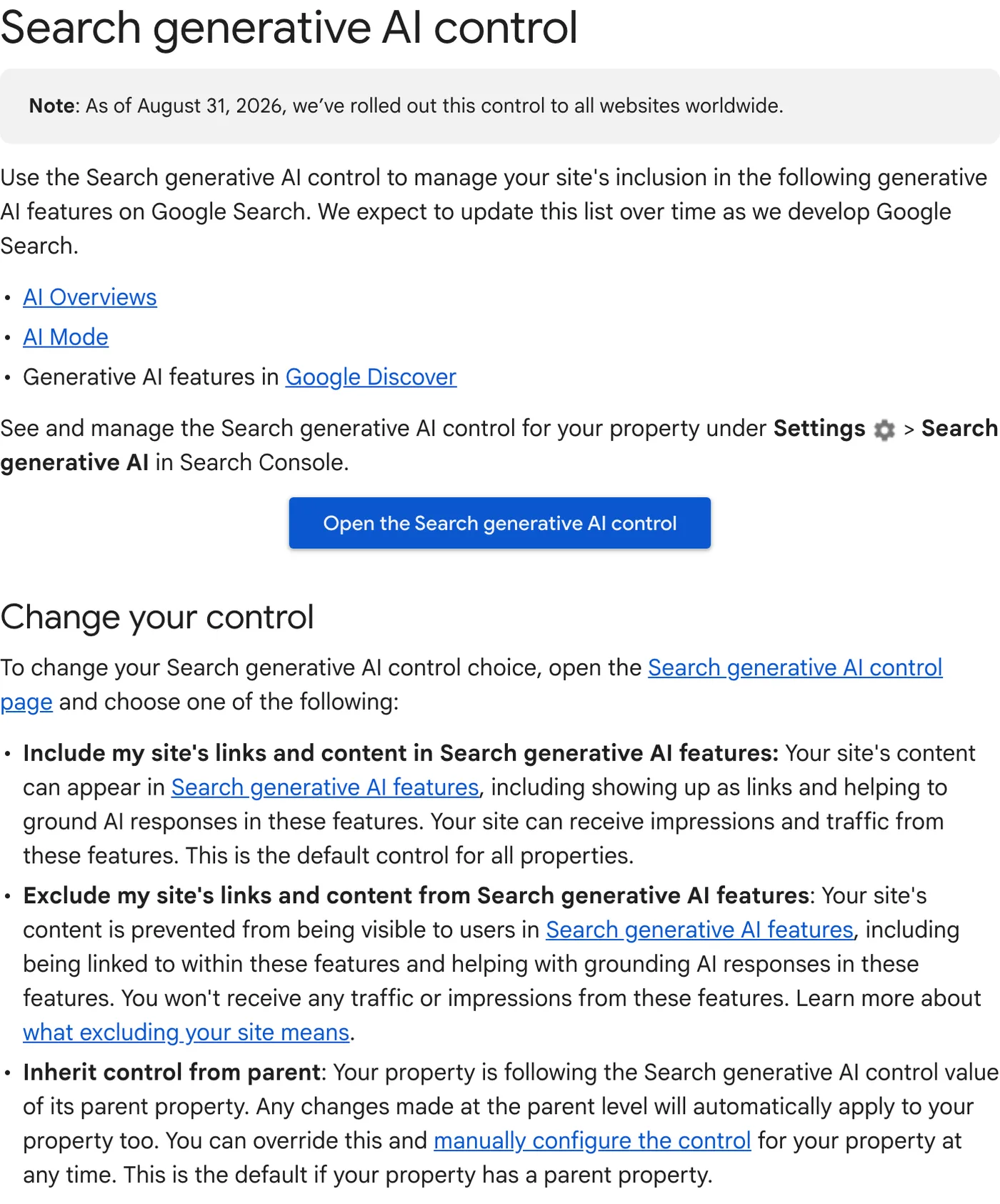
The Search generative AI control became available to all sites on 31 August 2026. Google says a change typically takes effect within one to two days, and that the setting does not affect model training; Google-Extended handles training separately.
The CDN item deserves special attention in 2026. Cloudflare’s explanation of its September 15 changes states that its “Block” and “Block on pages with ads” settings for training now apply to mixed-use crawlers, including Applebot, Bingbot, and Googlebot, so either setting affects search as well as training. Cloudflare’s alternative for sites that want to keep search visibility while refusing training is a setting called “Disallow AI Training”.
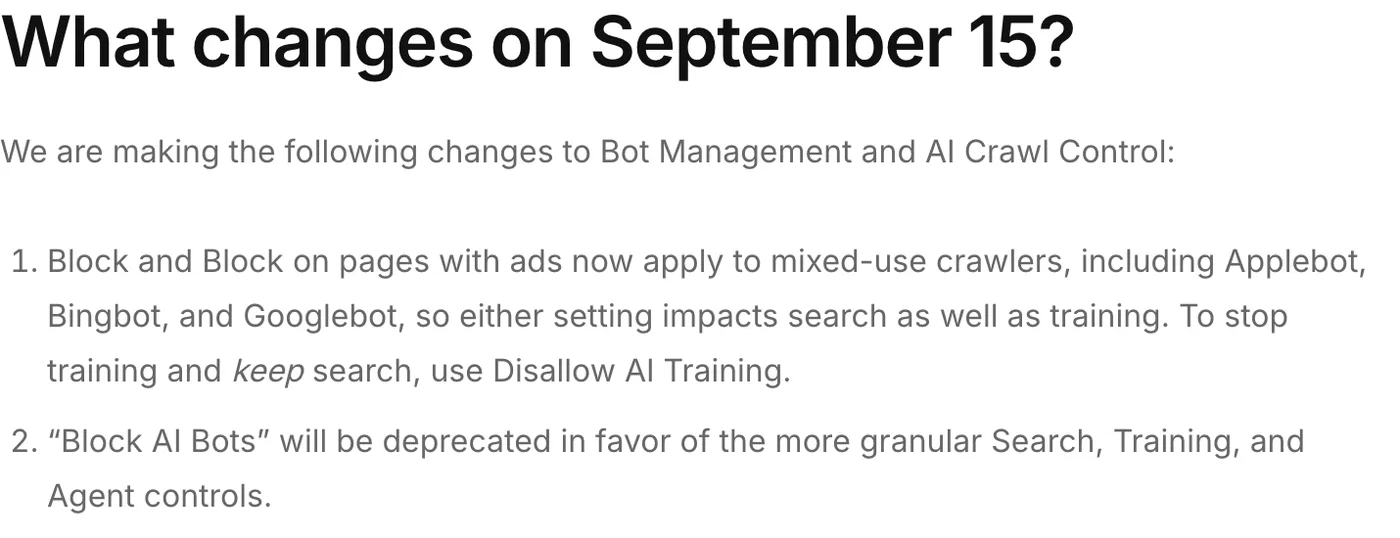
Cloudflare also changed defaults for new domains on that date: training and agent bots are blocked on pages that display ads, while search crawlers remain allowed. If a client moved a domain onto Cloudflare recently, confirm which policy it inherited instead of assuming the old behavior.
One small robots.txt detail also catches teams out: Google’s robots.txt documentation says Google does not support the crawl-delay rule. A Crawl-delay line may matter to other crawlers, but it does nothing to slow or prioritize Googlebot.
Check 1: can the important pages be reached?
Select the homepage, your main product or service page, a pricing or process page, and two substantive resources. For each, inspect the final status, redirects, canonical URL, indexing directives, and whether the main content is readable when logged out.
A homepage that loads is not proof that a deep article or login-free help page works. Check the exact URLs cited or expected to answer your questions.
OpenAI’s publisher guidance identifies OAI-SearchBot access as relevant to inclusion in ChatGPT summaries and snippets. Inspect both crawler rules and any edge security rules; changing robots.txt cannot fix every access problem.
Save technical failures as separate tickets. If the page is inaccessible, it is premature to conclude that its writing style is the reason it does not appear.
Test as the crawler, then verify with logs
A quick first test is to request each URL with a crawler’s user-agent string and compare the result with a normal browser request:
curl -s -o /dev/null -w "%{http_code} %{size_download}\n" \
  -A "Mozilla/5.0 AppleWebKit/537.36 (KHTML, like Gecko); compatible; OAI-SearchBot/1.4; +https://openai.com/searchbot" \
  https://www.example.com/pricing/
Repeat with the Googlebot, Bingbot, and PerplexityBot strings. A different status code or a much smaller response is a red flag worth investigating.
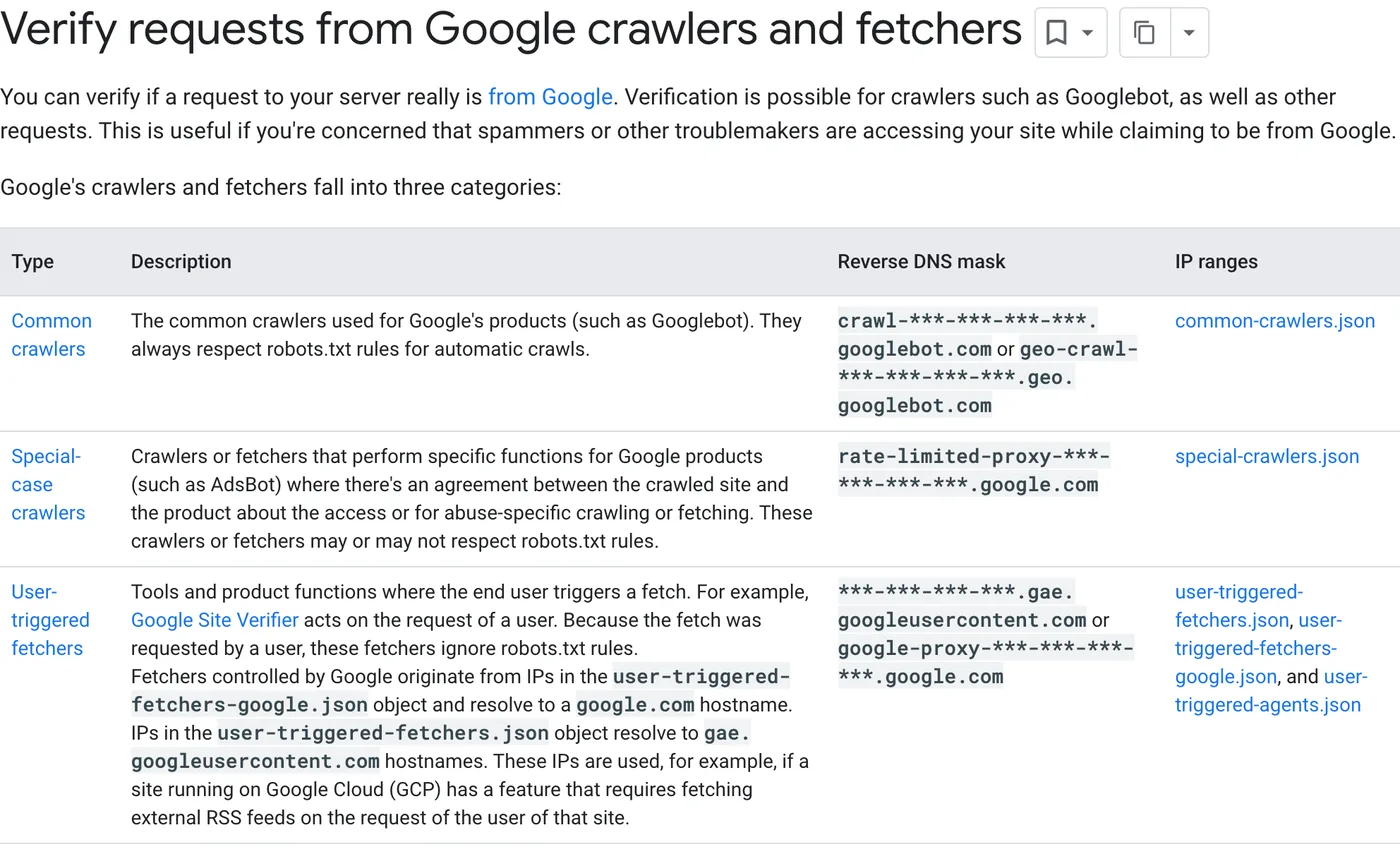
Understand the limits of this test. It proves only how your stack treats the user-agent string. Bot-management systems often verify crawlers by IP address, so a spoofed request can be treated differently from the real crawler in either direction. For Google, the URL Inspection tool shows the HTML that Googlebot actually received, which is the stronger evidence.
The definitive check is your logs. Real crawlers come from published addresses: Google documents a reverse DNS method and IP lists, OpenAI publishes searchbot.json, and Perplexity publishes perplexitybot.json. Anything claiming to be a crawler from another address is an impostor and should not be counted as a visit.
When we ran this check on seopressor.com, the origin server’s access log turned out to be the wrong place to look. It recorded the CDN’s edge addresses instead of the visitors’ addresses, and its log format had no user-agent field at all, so it could not show which AI crawlers had visited. Many sites behind a CDN have the same blind spot. Ask for CDN logs or enable a log format that records the user agent and the original client IP before you draw conclusions about crawler access.
Check 2: does the page contain the answer?
Read the page as a skeptical buyer. Highlight the exact passage that resolves the question. If you cannot identify it, a title containing the right keyword is not enough.
For a service comparison, look for fit criteria and tradeoffs. For pricing, look for the billing unit and meaningful exclusions. For a local business, look for actual service boundaries and current availability. For a technical product, look for version-specific instructions and failure conditions.
Use three editorial labels:
- Supported: the claim is clear and backed by a traceable source.
- Incomplete: useful information exists, but a decision-critical condition is missing.
- Unsupported: the page asserts something the team cannot currently substantiate.
Fix unsupported statements before polishing their presentation. An inaccurate answer that gets repeated more often is a business problem, not a visibility win.
Also check that the answer exists as text. Google’s guidance for AI features lists “making sure that important content is available in textual form” among its basics. A pricing table rendered as an image, a specification hidden in a PDF viewer, or an FAQ that loads only after a click may be readable to a buyer but weaker evidence for a retrieval system.
Check 3: inspect the cited sources, not just your absence
Open the sources supporting several representative answers. Record what they contribute: a specification, an independent review, a comparison, a local listing, original data, or a direct answer to a narrow question.
Do not copy their phrasing or assume their layout caused the citation. Instead, identify the information your own page lacks. A competitor may have a precise compatibility table while your page only says “integrates with leading tools.”
Microsoft’s AI Performance documentation announcement describes citation and page-level observations across supported experiences. Use available first-party data alongside your sample, while keeping the coverage of each dataset explicit.
Google now offers the equivalent for its own features: the Generative AI performance report in Search Console shows impressions in AI Overviews and AI Mode by page, country, device, and date. Compare its top pages with the pages your manual sample expected to see. A page that earns AI impressions for questions you never tested is a clue that your question set is missing something buyers ask.
Check 4: resolve conflicting business facts
Create a small fact register containing the canonical brand name, website, category, product names, service area, and the few claims buyers routinely verify. Give each fact an owner and a source URL.
Compare the register with your website, important directory profiles, product documentation, and recent announcements. A stale pricing page, renamed feature, or outdated address can create a more consequential problem than weak headline copy.
Record conflicts precisely: “Profile X lists Saturday opening at 9 AM; the current operations schedule says 10 AM.” That becomes an actionable correction. “Improve entity authority” does not tell anyone what to fix.
Include structured data in this comparison. Google advises making sure structured data matches the visible text on the page and keeping Merchant Center and Business Profile information up to date. An old price in Product markup, or opening hours in LocalBusiness markup that disagree with the page, is exactly the kind of conflict that produces a confident wrong answer.
Prioritize without pretending the score is scientific
Use a simple triage rubric: customer harm, commercial relevance, evidence confidence, and effort. Label any numeric score as your team’s prioritization method, not an engine ranking factor.
| Finding | Priority | Acceptance test |
|---|---|---|
| Site excluded by a platform setting or CDN bot policy | Urgent | Setting corrected and crawler access confirmed in logs |
| AI answer repeats an incorrect cancellation term | Urgent | Source policy corrected and all owned references aligned |
| Main comparison page returns an intermittent error | High | Exact URL consistently loads; server cause addressed |
| Useful answer lacks a worked example | Medium | Example covers inputs, result, and limitations |
| Decorative section has weak wording | Low | Address only after substantive gaps |
For a fictional software audit, correcting a false claim about data export should outrank adding six broad thought-leadership articles. The smaller task protects the buyer and gives future answers better evidence.
Turn the audit into a delivery brief
End with three to five tasks, each naming the question, page, missing evidence, owner, and review date. Save the baseline before making changes. Avoid changing every variable at once if you want to learn which intervention helped.
If you bring in outside help, such as the managed service mentioned at the start of this guide, give them the worksheet, the fact register, and the list of settings you checked. The worksheet stays your independent record of scope and results.
Use our buyer-question research process to expand the sample deliberately, and the AI visibility measurement guide to report changes without inflating them. For the differences between the platforms’ crawlers and reports, see our comparison of AEO, GEO, and SEO.
What a completed audit should contain
A reviewer should be able to open the question set, reproduce your recording method, inspect the saved answers, and understand why each task was chosen. Include a list of what you did not test, such as other languages, authenticated experiences, or markets outside the client’s scope.
The result is a baseline and a work plan. It is not proof that the brand will appear on the next run, and a one-session audit is not a substitute for observing variation over time.
Audit questions teams commonly ask
How often should we repeat the audit?
Repeat the full sampled audit quarterly, or after a major site change, migration, or CDN change. Check the first-party reports monthly. Re-run the settings checks immediately after any change to the CDN, security plugin, or Search Console property structure.
Should we test while logged in?
Run the baseline logged out or in a fresh session so results are comparable. If buyers in your market typically use a logged-in assistant, add a separate, clearly labeled set of runs rather than mixing the two.
Can we audit without access to the client’s systems?
You can sample answers and read pages without access, but the settings checks, Search Console, Bing Webmaster Tools, and CDN logs require it. Mark those checks as “not assessed” rather than assuming they pass.
Keep reading
More Competitive Research
What is Cannibalization in SEO?
Cannibalization in SEO happens when you have multiple pages competing for the same keywords and it's harming your rankings. Read more to…
How to Rank For a Keyword for Newbies
Learn how to rank for a keyword even for beginners where we guide you from keyword research to on-page SEO.

Keyword Research Guide for SEO
Keyword Research is the backbone of SEO. In this guide, we'll be showing you step by step guides of matching keywords to…