
Updating Your SEOPressor From V4 to V5
A step by step guide to upgrade SEOPressor version 4 to version 5.


We encourage all users to start updating their SEOPressor to the all new Version 5. We are going to retire Version 4 soon. Most users should have no problem updating from V4 to V5 but for those who do, here are a couple of ways to do it.
Manual Foolproof Method:
1) Go to https://seopressor.com/download/download.php
2) Key in your Clickbank Receipt number
3) Enter Captcha and click on “Show Domains”
4) Make sure your domain is in the list
5) Download plugin
6) Delete the existing V4 and install V5
All your existing keyword and settings are saved, so don’t worry about them getting lost during the update.
Automatic In-built Method:
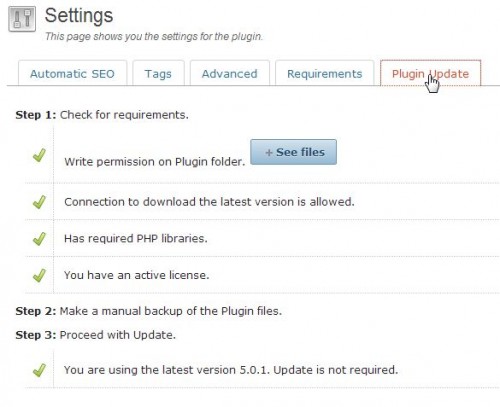
For users with versions 4.3.11 and above, you will see a link to update inside of WordPress,
(i) if your hosting allows external connection and;
(ii) if your plugins folder has the correct WRITE permission
See SEOPressor’s Settings > Update tab, it shows if you can do a one-click update or manual.
Keep reading
More General
How to Run a 30-Day AEO Pilot for an Agency Client
Scope a realistic 30-day AEO pilot with a fixed question set, baseline evidence, deliverables, ownership, and a decision framework for the next…

Digital PR for AI Search: Build Evidence Worth Citing
Plan digital PR for AI search using original evidence, clear methodology, honest distribution, and measurement that separates coverage from citations.

Turn Support Questions Into Helpful AEO and FAQ Content
Use recurring support questions to create accurate public FAQs and AEO content, with a triage rubric, answer template, privacy checks, and measurement.